
Troubleshooting
Common Causes
Section titled “Common Causes”If your AxON system stops charging your device, there are several potential root causes:
- The battery is drained: the power output to the device exceeds the production from the solar panel. This could be from an undersized system, poor solar panel placement, or extended sub-freezing or overcast conditions.
- The solar system is working, but the end device has an issue.
- The battery has failed. This is more likely than a solar panel failure.
- The solar panel isn’t working. This is rare, but possible.
Checking the Battery
Section titled “Checking the Battery”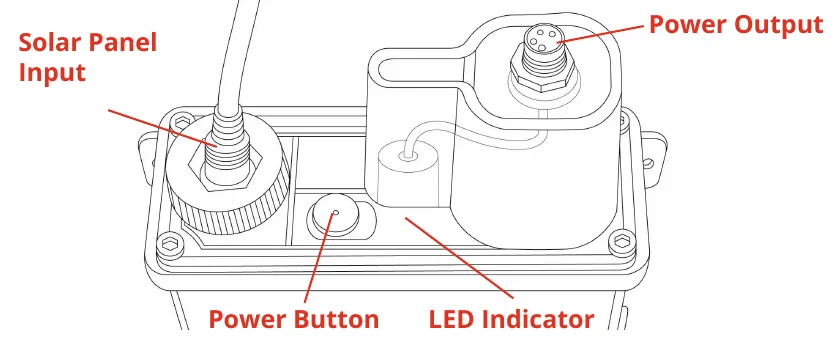
Press the Power Button once to make sure the output is on. AxON systems ship with the battery turned off.
Make sure the system is in a sunny location with the panel pointed at the sun. Look at the LED indicators: if they blink in sequence, the battery is charging.
If 1 or more of the 4 LEDs are lit, the battery has power and should be able to power your device. If just 1 LED is lit, the battery is close to empty and the system is likely underpowered. Consider:
- Moving the system to a sunnier, south-facing location
- Measuring the power consumption of your device accurately, to make sure you have the right size system. See System Sizing.
- Increasing the size of the solar panel, the battery or both
If no LEDs light up after you press the Power Button, or from the solar panel, the battery isn’t getting a charge. We suggest:
- Disconnect the power output cable.
- Loosen the gland around the Solar Panel Input, then disconnect and reconnect the solar panel.
- If the battery still isn’t charging, try connecting it to a USB wall charger with a W179 (opens in a new tab) cable. See Charging from AC / Mains.
Device Not Charging
Section titled “Device Not Charging”If the battery has a charge but doesn’t charge your device, we suggest:
- Check whether the device charges from a wall charger.
- Swap the output cable for another one.
Fault Indication
Section titled “Fault Indication”If all 4 LEDs flash several times, there could be a fault. Disconnect the M8 power cable and press the Power Button. If the flashing continues, also disconnect the Solar Panel Input and press the Power Button again. If a cable is causing the fault, replace it.